Posts

How to Add Dynamics 365 Extension in Visual studio(DevTools) in Dev Box

Image
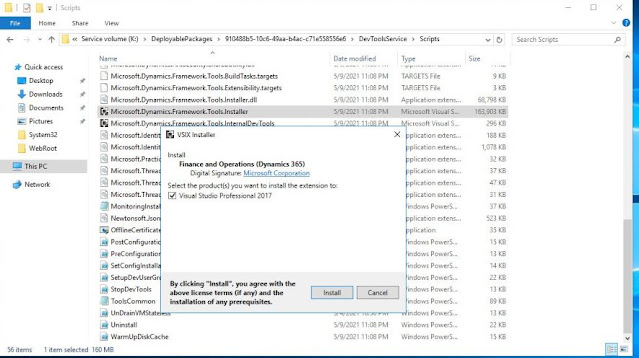
 I n order to install  Dynamics 365 Extension in Visual studio(DevTools)  Install VS 2019  include next workloads: .NET desktop development ASP.NET and web development Visual Studio extension development 2. Once you have VS Installed you have to install manually VSIX go to K:\DeployablePackages\...\DevToolsService\Scripts and use Microsoft.Dynamics.Framework.Tools.Installer

Release to Production Environment in Dynamics 365 F&O

 After you've successfully applied the update in the sandbox environment and are ready to move the update over to the production environment, follow these steps to mark an update as a release candidate. 1. Open the environment history page by selecting History > Environment changes on the environment details page. 2. Select the update to move over to the production environment. 3. In the details for the update, select Mark as release candidate. The Is Release Candidate option is set to Yes. After you've marked an update as a release candidate, follow these steps to update your environment. 1. Open the environment details page for the production environment. 2. Select Maintain > Update environment to apply an update. 3. In the Available sandboxes list, select the source sandbox environment where the update was applied, validated, and marked as a release candidate. 4. In the grid, select the update to apply to the production environment. This grid shows only u...

CONVERTING DATABASE FROM TIER 2 ( .BACPAC ) TO TIER 1 ( .BAK ) ON NEW DEVELOPER VM RELEASED WITH 10.0.21

Nice post my Rachit Garg https://brewingthought.com/2021/09/27/converting-database-from-tier-2-bacpac-to-tier-1-bak-on-new-developer-vm-released-with-10-0-21/

Office App Parameter and Excel Addin Settings in Dynamics 365 for finance and operation

Image
N avigate to   System administration > Setup > Office app parameters. In the App parameters fast tab, click  Initialize app parameters button App Parameters will be initialised In the Registered applets fast tab, click  Initialize applet registration button . Registered resources will look like this             Settings for store type - office store ·        App ID : WA104379629 ·        Store : en-US ·        Store Type : Office Store Settings for Store Type centralized deployment ·        App ID : 61bcc63f-b860-4280-8280-3e4fb5ea7726 ·        Store : EXCatalog ·        Store Type : Centralized Deployment

Understanding SQLDictionaryTable and AX data synchronization

Today we will talk about the objects' IDs and SQLDictionary table from SQL Server. Each object in AX (mainly classes,  tables and the columns, with the emphasis placed on tables and columns right now, since that is what gets committed in SQL Server) gets an ID in order to identify them. In AX 2012 the ID is allocated at the moment of the object's creation in the ax system (either through a xpo import, new object in AOT, or model import). Now, how does AX works with the tables in the SQL Server? The system will take the definition in the AOT and will commit that (the columns, their name, lenght, type) in SQL. So far, everything is going ok, but how is AX keeping track of what it has in the SQL Server? Matching the names of the objects would be enough? Let's see.  A table in SQL could be matched by it's name in the AX AOT. So, imagine that there is a change in a table's name, or easier, for the moment, a table column's name, going from colA to colB. The table, on...
Avoid writing Code at form level

Do not place code in a form unless you cannot place it in a class or in a table method. Code written on forms cannot be reused and is difficult to customize. A class that processes all the logic in a form should have the same name as the form with "Form" as the suffix. If you have a complex form, create a class for server-related tasks. This class should have the same name as the form, but with "Server" as the suffix. If you have code in the form, the code should be for making only simple changes to the appearance of the form or to the form’s query. Try to place the code on the form or on the data source. Place code directly on controls only when you are absolutely certain that there is no other solution, and then use the AutoDeclaration property on these controls. Reasons for Removing Code from Forms ·         Forms are entirely client-based. There should be no code in them that manipulates the database (business logic). The code should be ...

AX Code Review Checklist

If you are a senior developer on Dynamics AX, you may wonder how come these issues still exist. This is the reason why I decided to write this article. Developments are now shared among diverse team, sometimes across multiple partners and outsourced to vendors, meaning different skills and processes. Therefore such well known issues still remain in production when customized best practices rules and internal review are not properly defined. The following list is not exhaustive and is only based on our experience from the field. 1. Wrong caching leads to unnecessary database calls This is one of the most fundamental feature of the product today. The three tiers architecture of Dynamics AX allows you to define caching on AOS and client. Not using caching properly is the first root cause for performance. Make sure the following rules are defined: All your customized tables have relevant table group defined in AOT. For example, master data should have “Main” category and transact...

Setting up Version control in dynamics 365 for operations

Good Article https://stoneridgesoftware.com/setting-up-version-control-in-dynamics-365-for-operations-with-visual-studio/

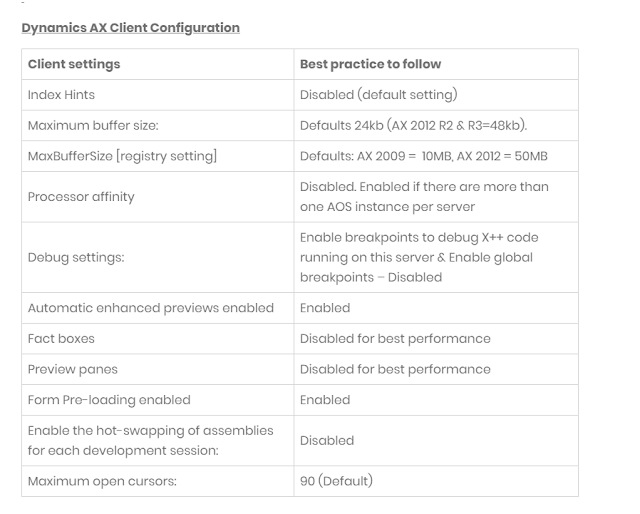
Best Performance Tips for Dynamics AX 2012

Image

where the source code is kept in Microsoft dynamics 365 finance and operations

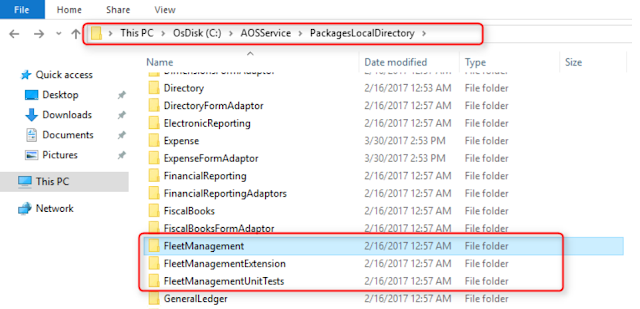
If you have every worked in AX2009, you know that the source code is saved in files in a specific file location in the AOS server. Now with D365Ops, Microsoft has fallen back to the concept of storing the files in file system instead of database (model database in AX2012 used to hold all the code base).  For the developers working with D365Ops, the primary question is  where & how  the source code is kept & handled.  Where to find the Source code:   The application code for Dynamics 365 for operations is stored in File system, usually in a directory named PackageDirectory. You can find the details on the configuration related to AOS in a  web.config  file.  Steps to follow:  1.      Open IIS and go to the Sites\AOSService  (in case you missed, AOS is a web service with D365Ops) . 2.      Right click > Explore 3.      You should be directed to a fol...

Introduction of Extensions in Dynamics 365 for Operations

Image
Extensions aren’t available in Dynamics AX 2012. Dynamics 365 for Operations introduces extensions.  This allows us to add functionality to existing code.  We can create new elements and create extensions of referenced elements in our project.  By creating extension elements, all the customizations and code are stored in a separate assembly, which contains only the code added or changed in the extension. Since this code resides in a separate assembly, it improves the performance of building and testing. This approach is also ideal when it comes to upgrading, as it eliminates metadata conflicts. With extensions, we can extend an object without touching the base object. This means  we can add new fields, methods, or controls to tables, classes, and forms and those additions are contained in our own extension object.  We have not affected the base object. Also, the base objects have many, many events added to them.

Elements in Dynamics 365 for Operation

Image
Elements  in Dynamics 365 for Operation are the objects that reside in the  AOT  in the  Application Explorer . Elements can be customized once they are added to a specific  project or model A Dynamics 365 for Operation  model  is a group or  collection of elements . A model is a design time concept. A model may contain multiple  Visual Studio projects,  each containing a subset (or all) of  elements  from the originating model. A Dynamics 365 for Operation  package  is a deployment unit may contain  one or more models . In addition to elements, this includes model metadata, which is the descriptive data that defines the properties and behavior of the model.  A package can be exported to a file, which can then be deployed into a staging or production environment. Packages are folders located in the  model   store folder , as can be seen below: Model folders are contained in their pa...

Source control in Dynamics AX 365 for finance and operations

In Dynamics 365 for Operation, you could either use Team Foundation or Git. Each developer needs their own virtual machine (VM).  This was already the recommended approach with Dynamics AX 2012; now, with Dynamics 365 for Operation, it’s mandatory. You will need a TFS/VSO server that has a main repository  (typically the code that matches your Production AX environment). Then you branch off a development branch from the main repository.  Each of your developers will have their own VM and connect to the same branch. All check-ins and check-outs are happening against the dev branch, and, upon check-in, your developers will get the popup window to resolve conflicts.  Once they get used to it, they should be resolve any conflicts on their own by just looking at it; no big overheads here. If development is finished and tested and you are ready to release it to production, all you need to do is hand-pick the change sets that are ready to go and merge them with th...

Create Model in Dynamics 365 for Operations

Image
How to Create a Model in Dynamics 365 for Operations A model, which is a collection of elements that represent a distributable software solution, can be created using a wizard. To create a model, navigate to  Dynamics 365 > Model Management > Create model. It’ll open a wizard for creating a model. In this window, we can specify the model name. For this example, the model is called “AirlineReservation.” For the “publisher,” we type in our name or the publisher’s name. Give a short description in the model description. Give the “model display name.” This is the name that’ll be seen in the Application Explorer in the Application Object Tree (AOT). Click “Next.” Here, a page will open with two options. If “Select existing package” is chosen, that means we’ll be using our over-layering or customization development approach. In this, we must select a model that contains the elements we wish to customize as a referenced model in the wizard. In this way, ...

Creating Data Entities in Microsoft Dynamics D365 FO AX

Image
Very nice article from a blog i have read. Data Entity is a new concept which has been introduced in D365FO and has major use in Data Import/Export and for Data Integration. Create a Project Solution Explorer > Right click the Project > Click Add > New Item Select ‘Data Entity’ > Place the name for the entity > Click Add Data Entity Wizard would pop-out Select the Entity Category and then select the Primary Data Source for the Entity There are 2 check boxes available in the wizard: Enable API – Check this if you would like to use this entity for Integration pupose Enable Data Management capabilities – Check this, if you would like to use this entity for Data Import/Export purpose Click Next A window will appear, where you can Add a new Data Source for the Entity and their respective fields, Remove Data Sources, remove fields, etc. After making the changes, click Finish – Entity creation is completed.