Posts

Microsoft Dynamics Ax Table Method

Methods are used for adding X++ code to your application. The code in methods is also referred to as business logic. Whenever records are changed, inserted or deleted from a table various default methods are executed. We can change the default methods and by doing so we are overriding the default methods. To override a method go to the Methods node of a table, right click and choose Override Method. Below are few examples of Overriding commonly used Table methods: initValue(): If we create a new record from the table browser or a form the table method initValue() is executed. It is used to set a default value for the fields. Example (1): Let’s override intiValue for MyFirstTable and set default value for custGroupId public void initValue() { super(); this.custGroupId = "10"; } After adding this method, open table MyFirstTable  through Table browser and press ctrl+n to create a new record. The field custGroupId will now have the default value 10. modifiedField(...
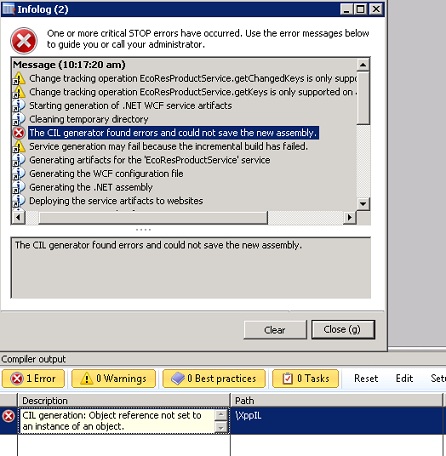
Error " The CIL generator found errors and could not save the new assembly"

Image
On this post I would like to discuss how to solve the CIL compilation error when deploying services for the first time in AX 2012. I have been working on a newly installed AX 2012 CU2 instance this week, and I deployed both  basic  and  enhanced  services.  This action was successfully done and I did not experience any issues. However, when I created a new service group and I deployed it, I encounter an error saying “ The CIL generator found errors and could not save the new assembly ”.   Now, this instance of AX 2012 is using a restored DB backup from another instance as I needed some data and objects already existing. It makes sense to think that this issue is true from the premise that I never went through a full AX and CIL compilation.  In addition, when generating the services through the installation, the references to the .NET Module File and the AX Application DLL were correct, but where they referring to the correct .NET Assembly types f...

"NO DEVICE ERROR" when starting AX2012 / AX2009 Client

Hi All, We often see that  the infolog pops-up with an error message: 'No Device' This error message is displayed when opening the AX client with the Configuration Key  "Telephony Integration"  enabled. This error message is caused by the ActiveX component for the phone integration on form smmPhone which returns an error for each phone device which is offline. The solution to this error is disabling the Telephony Integration which we generally never use. Steps are as follows : Click  System administration  >  Setup  >  Licensing  >  License configuration . In the  License configuration  form, expand the  Sales and marketing series  node, and then UNSelect/Unmark   the  Telephony integration  check box. Click  Apply . Close AX Client and restart. !! No Infolog.

AX2012 R2 : X++ code to create and post Inventory Movement Journal

Below is X++ code which is good to keep handy. It can be used to create and post inventory movement journals in AX 2012 R2. I have use hard coded values for illustration purpose:         InventJournalTable              inventJournalTable;         InventJournalTrans              inventJournalTrans;         InventJournalNameId             inventJournalName;         InventDim                            inventDim;         JournalCheckPost               journalCheckPost;         //Below code creates journal header               inventJournalTable.clear();         inventJournalName =  InventJournalName:...

Debug::assert In MS Dynamics Axapta

This method allows to check if some Boolean condition evaluates to true and if it doesn't - stop further execution and show stack trace. Debug::assert() should be used to validate some assumptions made in the code which should never happen if nothing is broken in the application. It means that wrong user input should not be asserted but rather validated by normal if statement and exception should be thrown if the input is wrong. However, if the code relies, for example, on query data source name, which can be broken only in development time - that is a good place to add assert to. Example:     Query query = new Query(querystr(Alertsetup));     QueryBuildDataSource qbds;     ;     qbds = query.dataSourceName(identifierstr(EventRule));     Debug::assert(qbds != null);

interview Questions AX 2012

1. What’s new in Dynamics AX 2012 SSAS - Analysis service project wizard. AOS - Validfrom and validto columns, Unit of work class, Inheritance among the tables Client -Form styles, Search and parts EP - Sharepoint 2010, listpge famework, windows live authentication Morphe x - Models and model store, dev. workspace, some layers renamed and powershell SSRS – Labels in reports, auto reports, cross reference can access, unlimited dimensions X++ -Eventing, attributes, .Net proxies to X++ classes, faster compilition 2. What are the architecture changes done in AX 2012 R2? The model store and the transaction data are stored in separate OLTP databases. In other versions of Microsoft Dynamics AX 2012 prior to Microsoft Dynamics AX 2012 R2, the model store and transaction data are stored in a single OLTP. 3. What are Partitions? What is the purpose of partitions in Microsoft Dynamics AX 2012 R2? http://msdn.microsoft.com/en-us/library/jj677285.aspx 4. What are Models and Model st...

Restoring the Database with the SQL command

RESTORE DATABASE AXDB FROM DISK = ‘d:\test.bak’ WITH REPLACE